This blog can also be read in PDF format exported from LaTeX, in three different versions:
- Generic: The default template experience of LaTeX
- CM templated: LaTeX allows customisation to align to corporate brand requirements
- CM templated slides: LaTeX can also utilise different layout types
The dream of the perfectly formatted document
There is a particular kind of pleasure in opening a document that is simply right. The margins are calming spaces in which you can breathe. Headings sit exactly where your eye expects them to. The font is consistent and legible, as if it has been chosen with intention rather than inherited by accident. Mathematics flows naturally within the text; equations are aligned and spaced so that they can be read rather than decoded. Figures do not float awkwardly or interrupt paragraphs; they belong exactly where they appear, referenced cleanly, scaled proportionally and captioned with quiet confidence. Nothing jumps; nothing shifts; nothing feels improvised. The document does not draw attention to its formatting at all—it lets the content speak. And at some point, almost involuntarily, a thought forms: Why don’t all my documents look like this?
The reality
And then you open your eyes, and your document stares back at you.
For most people, a text editor such as Microsoft Word, Google Docs, LibreOffice Writer, Apple Pages or Notepad++ is the default. It is where documents begin by habit rather than by choice. And almost everyone who has used it for anything longer or more complex than a one-page note knows the familiar descent into chaos. A heading changes size for no apparent reason. An image refuses to stay where you put it, drifting across pages as if it has a will of its own. A table that looked fine a moment ago suddenly misaligns, splits or shifts when you add a single line of text. You copy a paragraph from another document and, along with the words, import a small army of invisible formatting rules that quietly undo your carefully set styles. Mathematical formulae add another layer of friction: equations feel bolted on rather than native, spacing is inconsistent, and even small edits can break alignment or force you back into the equation editor yet again.
The result is that writing becomes secondary. Time and attention are diverted away from thinking, explaining and structuring ideas, and spent instead on nudging margins, reapplying styles, fixing equations and trying to persuade the document to behave. The tool that was supposed to help you communicate ends up demanding constant supervision—and the ‘perfect’ document from a moment ago starts to feel very far away.
Enter LaTeX: what it is (and where it comes from)
This is where LaTeX enters the picture.
LaTeX (LAH-tekh or LAY-tekh) is built on top of TeX, a professional typesetting system created by Donald Knuth. The name TeX itself comes from the Greek word τέχνη (téchnē), meaning craft, art or technique—an origin that is anything but accidental. TeX was designed with the explicit goal of producing documents of the highest typographical quality, reliably and at scale. LaTeX is the layer that makes this power usable in practice: a structured way of writing documents where you describe what something is (a section, an equation, a figure, a reference) and let the system take care of how it should look.
Unlike general-purpose word processors, LaTeX is not a visual editor and it is not a collection of formatting tricks. It is a typesetting system, widely used in mathematics, science, engineering and academia, and it exists as a rich, open-source ecosystem. While there are polished commercial tools built around it, the core technology is free, transparent and continuously maintained by a global community. The result is a tool that treats documents not as fragile layouts to be protected, but as structured objects that can be rendered beautifully, consistently and predictably—every single time. If you write mathematics, technical documents, teaching materials or anything long and structured, this matters.
What LaTeX does exceptionally well
Where LaTeX truly shines is in the things that tend to cause the most trouble elsewhere. Mathematics is a prime example: equations are written naturally, aligned cleanly, numbered automatically, and spaced in a way that makes them readable rather than merely present. Tables behave like tables—not like fragile arrangements of boxes—staying aligned and consistent even as content changes. Figures integrate seamlessly with the surrounding text: placed deliberately, referenced reliably and captioned without guesswork. Crucially, those figures do not have to be imported from elsewhere: graphs, diagrams and illustrations can be created directly within LaTeX itself. This includes everything from a simple triangle, through coordinate plots or statistical graphs, to flowcharts, mind maps and schematic diagrams, all defined precisely in code. And because these figures are vector-based, they retain perfect quality at any scale—zoom in, zoom out, print on a super-sized poster or embed in a PDF, and nothing degrades. Hyperlinks work out of the box and are handled intelligently, with internal references and external links treated differently by default. Underneath all of this is a layout engine designed for stability and precision, so documents do not slowly unravel as they grow; they scale cleanly from a single page to hundreds, with formatting automatically taken care of rather than constantly negotiated.
Document classes and reusable content
Another place where LaTeX reveals its underlying philosophy is in the way it handles different kinds of documents. Rather than starting from a blank page and forcing everything into the same mould, LaTeX asks you to declare your intent upfront by choosing a document class. An article, a report, a book or a presentation are treated as fundamentally different objects, each with its own logic and structure. This has a powerful consequence: the same content can often be reused with minimal effort across different formats. Notes written as an article can be turned into a set of presentation slides simply by switching to a beamer class, without rewriting the mathematics, figures or explanations. Because formatting is not embedded in the text itself, copying material between documents does not carry hidden styling baggage with it. Content moves cleanly from one template to another, and when compiled, it automatically conforms to the new class or style—consistent, predictable and perfectly aligned with its new purpose. And speaking of styles, LaTeX makes branding much easier to manage. When a logo, colour scheme or layout changes, you update it once in a single place, recompile the document and everything updates automatically—no more manually reformatting every document, page by page.
Power-user features people don’t expect
This is where LaTeX starts to feel like a productivity multiplier rather than just a document editor. Once you move past single, one-off files, it becomes possible to do more with the same effort: reuse content, generate variations and keep everything consistent without constantly redoing work. The payoff is not just nicer-looking documents, but a fundamentally different way of working. At its core, this works a bit like mail merge—the same idea of producing many related documents from a single source—but without being restricted to plain text. In LaTeX, the reusable pieces can include full mathematical expressions, tables, figures, icons and even diagrams—anything that can be described in code can be generated and reused in exactly the same way. And because everything is written in a structured way, you can repeat, adapt or combine content without copying and pasting entire sections by hand. This makes it practical to create families of documents that share a common structure while differing in content, all without sacrificing layout or typographical quality. Because LaTeX documents are plain text, changes can be tracked, compared and versioned reliably over time. As a side effect, documents remain surprisingly efficient: when graphs, figures and diagrams are defined within LaTeX itself rather than embedded as heavy images, even very large documents with hundreds of pages can have remarkably small file sizes.
That efficiency extends beyond the documents themselves and into the way LaTeX fits into real working environments. On a work device where installing software freely is not an option, the system can be set up only once; packages and functionality are then managed centrally and updated without constant intervention. If working locally is not an option at all, online platforms provide a fully equivalent experience. Overleaf is the classic choice, and more recently I had discovered Crixet—it has since joined OpenAI and is now Prism—which appears to be at least as powerful and, in many ways, quite exciting. In both cases, the output matches what you would get from a local installation, rather than being a simplified approximation.
All of this naturally raises the question: How does LaTeX make this possible in the first place?
LaTeX as ‘friendly programming’
One of the reasons LaTeX unlocks so much flexibility is that, at heart, it sits at the point where human typesetting meets basic programming. You are not telling the computer how to draw every single line or where to place every single symbol (although you could if you really wanted to—LaTeX can do that too); you are describing what something is and letting the system handle the details. You do this using commands, most of which begin with a backslash \; this simply tells LaTeX that what follows has a special meaning. Curly brackets {} are used to group content and define what a command should act on, while square brackets [] are typically used for optional information. Mathematical content is usually written inside $...$, making it explicit what should be treated as mathematics and what should be treated as text. For example, a fraction is written as $\frac{<numerator>}{<denominator>}$; a square root of x as $\sqrt{x}$ (and if you want a cube root, just add a ‘3’ like this: $\sqrt[3]{x}$); a sum is \sum and an integral is \int; for example: $\sum_{r=1}^{10} r$ will give you
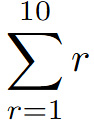
and $\int x dx$ will give you ∫𝑥 d𝑥 . The result is readable, predictable and remarkably close to the way mathematicians already think about notation.
This programming-like approach also explains why LaTeX scales so well. Functionality is added through packages, each one extending what the system knows how to do. Over time, patterns emerge: familiar structures, commands and solutions that you return to again and again. For anyone with a mathematical background, even the syntax feels intuitive—opening and closing brackets behave exactly as you would expect, nesting works cleanly, and structure is explicit rather than hidden. At the same time, LaTeX makes it easy to work with a wide range of notation: accented characters, umlauts, and language-specific marks above or below letters can be added directly, without switching keyboard layouts or installing separate language settings. The system also gives you access to an enormous universe of symbols, far beyond what most editors provide; this is documented in resources such as The Comprehensive LaTeX Symbol List, a catalogue running to over 600 pages and including 25 731 symbols, as of its 12 April 2026 edition. The place to find both functionality and documentation is CTAN, the Comprehensive TeX Archive Network, which serves as the central catalogue of LaTeX packages, and is complemented by a large, active support community, including platforms such as TeX Stack Exchange. The outcome is a system that rewards clarity and precision of thought, and translates both—almost automatically—into consistently elegant, professionally typeset output.
Accessibility and inclusivity
Beyond elegance and typographical beauty, there is another dimension where LaTeX matters: accessibility. Because LaTeX documents are built on explicit structure and semantic meaning, they tend to behave better (compared with other text editors) when read by assistive technologies. Text, mathematics, references and document hierarchies are not merely visual artefacts; they are encoded in a way that preserves intent, which is essential for screen readers and other accessibility tools.
A small but telling example makes this difference clear. I recently used 'x∈R’: typed it in Word, exported it to PDF, and then had Adobe read it aloud. This resulted in the unhelpful ‘Warning, empty page’ (those words exactly). The symbols are visually present, but semantically invisible. When I typed the same in LaTeX and exported it to PDF the outcome was not perfect, but it was at least recognised as mathematics: the reader detected symbols, structure and relationships rather than silence. That distinction matters; meaning has a chance to survive the transition from visual layout to spoken language, and mathematical content is not excluded by default.
LaTeX does not magically solve all accessibility challenges, but it starts from a much stronger position. By prioritising structure over appearance, it opens the door to documents that are not only beautiful to look at, but also more inclusive in how they can be accessed, interpreted and understood.
Don’t want to take my word for it? You don’t have to. The American, European and London Mathematical Societies (AMS, EMS and LMS) and the Society for Industrial and Applied Mathematics (SIAM) released Author Guidelines for Preparing Accessible Mathematics Content earlier this year, with the updated version being dated as recently as 6 May 2026. Fun fact: Even though Word was clearly used to typeset the guidelines, their content does not even mention a possibility of using software other than LaTeX; and that is saying something!
Culture, memes and the human side
LaTeX also comes with a culture—one that is surprisingly self-aware, generous with humour and built around shared experience. If you have ever seen the difficulty-curve meme contrasting Word and TeX, you will recognise the feeling immediately: Word feels easy right up until it suddenly is not, while LaTeX looks intimidating at first and then levels out into something calm and predictable. There is also the near-universal joke about moving a table by a millimetre in Word and watching the entire document disintegrate. These memes are funny because they are painfully accurate, and because almost everyone has been there. LaTeX users are not pretending the learning curve does not exist—we are simply laughing about it together.
That same community mindset also shows up in creativity, and it is something I have been exploring myself. Beyond papers and slides, LaTeX can be taken into less obvious territory. I have recently experimented with creating animated PDFs—genuinely animated within the document. This worked beautifully on my Windows laptop (less so on my Android phone), but even so, it is already more than I have ever managed to persuade documents from other text editors to do. I have also taken it a step further and started creating videos using LaTeX, with some ImageMagick and other trickery along the way. For me, that is part of the appeal: once you start thinking of LaTeX as a system rather than merely a document editor, the boundaries of what you can create begin to shift, and LaTeX can remain at the core of the creative process even when the final output is something as far removed from a traditional document as a video.
Honest conclusion: the learning curve and the payoff
So yes—LaTeX does take time to learn. There is syntax to understand, structure to get used to, and moments where a missing bracket or symbol will stop everything until you find it. But the alternative is not ‘no effort’; it is a different kind of effort, paid repeatedly. It is the constant friction of fighting formatting, fixing layout and repairing documents that slowly drift out of shape as they grow. LaTeX shifts that effort to be upfront, and in doing so reduces it over time, replacing repeated manual adjustments with consistency, scalability, and output that looks professional by default rather than by accident. Over time, documents become easier to maintain, reuse and extend, and your attention stays where it belongs: on the content itself. Many people who make that switch find the same thing—once you have worked this way, it is surprisingly difficult to go back.
Ready to try it yourself?
Curious to try LaTeX for yourself? Don’t be shy then! There are many great, helpful resources out there, such as
and Prism even allows you to ‘ask anything’ using human-language prompts and writes the code for you!
The result of using Prism to create an image. The prompt was ‘draw a green flower’.
Join the conversation: You can message us @CambridgeMaths or comment below.